Competitor Ad Monitoring: Turn Rival Ads Into Briefs
Your competitor launches 27 new ads on Monday.
By Friday, the ugly ones are gone. Three video hooks are still live. Two statics are sending traffic to the same landing page. Every surviving ad says the same thing in a slightly different way.
That is not random inspiration.
That is a market signal.
Most teams miss it because they treat competitor research like a moodboard exercise. They scroll the Meta Ad Library, screenshot a few ads, drop them into Slack, and call it strategy. Then two weeks later nobody remembers why the ads were saved, which ones were new, which ones kept running, or what the next brief should actually say.
Competitor ad monitoring fixes that.
Not by helping you copy competitors. By helping you see what the market is testing before you spend your own budget guessing.
30-Second Summary
- Competitor ad monitoring is the habit of tracking what rival brands launch, repeat, retire, and route traffic toward.
- The Meta Ad Library gives you public visibility, but manual research breaks once you track more than a few brands.
- The Apify Meta Ad Library Scraper is the DIY data pipeline: pull ads by URL, Page ID, country, keyword, status, format, and sort mode.
- Raw ad data is only step one. The real value is knowing what changed and what your team should make next.
- Seercraft turns the whole loop into a product workflow: Discovery finds relevant ads, Seer Eye tracks competitors, AI Boards organize the best references, and AI Brief turns patterns into production-ready direction.
Competitor Monitoring Is Not Looking At Ads
Looking at ads is easy.
You can open an ad library right now and find a nice-looking example from a brand you respect. That is useful for inspiration, but it does not answer the questions that actually matter:
- What did they launch this week?
- What did they keep live?
- What format are they moving toward?
- What promise keeps showing up?
- Which landing pages are tied to which claims?
- Which angle is everyone in the category suddenly testing?
Those are monitoring questions.
A saved screenshot says, "This ad looks interesting."
A monitoring system says, "This competitor is testing founder-led videos, but only the testimonial version stayed live. They are pushing trial instead of discount. The landing page has shifted from product detail to quiz."
That second sentence can become a brief.
The Three Signals Worth Tracking
You do not need to track everything. You need to track the signals that change creative decisions.
1. Launches
New ads show what a brand is willing to test now.
If a competitor suddenly launches 40 creatives around one product, that tells you where their attention is going. If three brands in your category launch the same style of comparison ad in the same month, that tells you the category conversation is shifting.
Launches are useful because they show curiosity.
2. Repetition
Repeated ads show conviction.
Anyone can test one hook. When a brand repeats a hook across statics, UGC, carousels, and landing pages, they are telling you the message matters.
That is where competitor monitoring gets interesting. The insight is rarely "they made a good ad." The insight is "they keep saying the same thing because it probably moves the customer."
3. Routing
The landing page tells you how seriously to take the ad.
An ad sending traffic to a generic product page may be a lightweight test. An ad sending traffic to a dedicated quiz, advertorial, product bundle, or campaign page tells you the brand built a fuller funnel around the idea.
Great monitoring connects creative to destination:
- Hook
- Offer
- CTA
- Landing page
- Product
- Audience
- Follow-up angle
That is how you stop collecting ads and start reading strategy.
The DIY Route: Scrape Meta Ads With Apify
If you want to build your own competitor monitoring system, start with structured data.
The fastest route is the Meta Ad Library Scraper on Apify. It turns Meta Ad Library searches into usable ad data instead of screenshots and copied links.
You can run it with a direct Meta Ad Library URL, or you can build the search from parameters:
{
  "country": "US",
  "pageId": "108047081396228",
  "activeStatus": "active",
  "mediaType": "video",
  "sortMode": "start_date"
}
You can also search by keyword:
{
  "country": "US",
  "searchQuery": "protein powder",
  "activeStatus": "active",
  "mediaType": "all",
  "sortMode": "total_impressions"
}
The actor can return structured fields like brand, copy, CTA, landing URL, image assets, video assets, platform breakdown, active status, start date, and format.
That changes the job.
Instead of asking someone to scroll for an hour and paste screenshots into a doc, you can ask:
- Which competitors launched new ads this week?
- Which hooks appeared across more than one brand?
- Which ads are video versus static?
- Which CTAs are most common?
- Which landing pages are being pushed?
- Which ads are still active compared with last week?
This is the minimum viable competitor intelligence loop.
A Simple Apify Monitoring System
Here is the lean version.
Pick 10 competitors. For each one, store the brand name, website, Meta Page ID or Ad Library URL, market, and the reason you care about them.
Then run the Apify actor every week.
Push the output into Google Sheets, Airtable, Notion, a database, or whatever system your team actually checks. Add a simple weekly review column:
- New
- Repeated
- Worth saving
- Worth briefing
- Ignore
That is enough to start.
You do not need a perfect intelligence platform on day one. You need a habit that tells you what changed.
But this is also where most DIY systems start to slow down.
The scraper gives you the raw material. It does not decide what matters. It does not keep your team's swipe file clean. It does not explain the insight to a designer. It does not turn the best ads into a brief.
That is the difference between a data pipeline and a creative workflow.
The Trap: More Data Can Make You Slower
This is the part people underestimate.
When you scrape competitor ads successfully, you do not suddenly have strategy. You have more ads.
More ads means more review, more tagging, more duplicated references, more "can someone summarize this?" messages, and more half-finished spreadsheets.
The bottleneck moves.
Before scraping, the bottleneck was access.
After scraping, the bottleneck is judgment.
You still need to answer:
- Which ads matter?
- Why do they matter?
- What pattern are we seeing?
- What should we make because of this?
- Which references belong in the brief?
- Who needs to see this?
That is where Seercraft comes in.
How Seercraft Turns Monitoring Into a Creative System
Seercraft is built for the full research-to-brief loop.
Use Apify when you want the raw data pipeline and you are comfortable building the rest. Use Seercraft when you want the workflow already assembled for a marketing team.
Here is what that looks like.
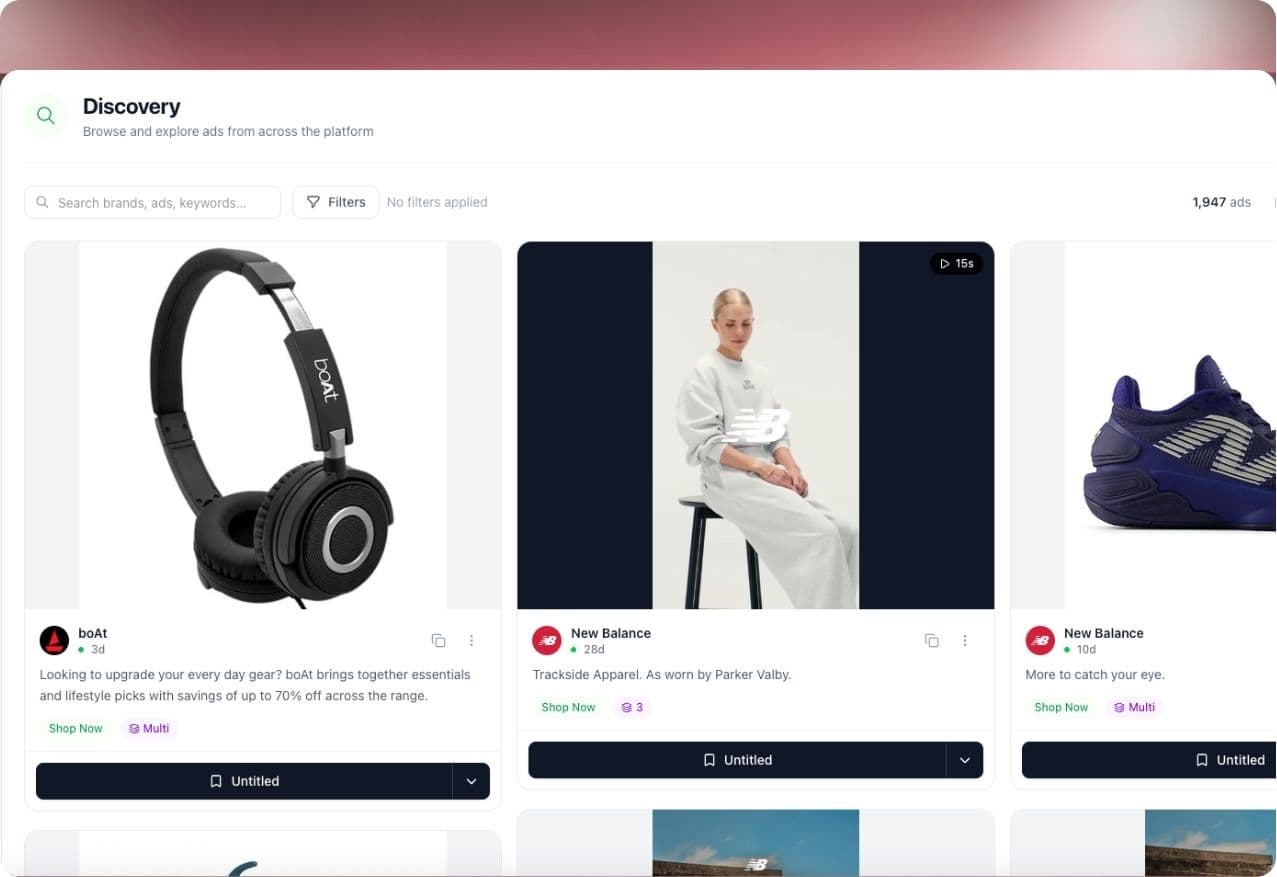
Start In Discovery
Seer Discovery is where you stop searching like a tourist and start searching like a strategist.
A weak search is:
"Nike ads"
A useful search is:
"DTC fitness app UGC ads for beginners who feel lost at the gym"
Or:
"Skincare testimonial video ads using before and after proof"
Or:
"SaaS founder-led ads selling time savings to small business owners"
Discovery helps you find relevant ads by brand, category, keyword, format, platform, and creative angle. That matters because your best idea may not come from a direct competitor.
A skincare brand can learn from supplements. A productivity SaaS can learn from fintech. A fitness app can learn from meal plans. Adjacent categories often sell the same desire with fresher language.
That is where the interesting ads usually are.
Let Seer Eye Watch The Competitors
Seer Eye is the monitoring layer.
Once you know which competitors matter, you should not have to rebuild the same search every week. You need to know what changed.
Seer Eye helps you track new ads, repeated messaging, format shifts, campaign movement, and the brands that are becoming more aggressive.
The goal is not to stare at every ad.
The goal is to notice moments like:
- A competitor moved from discount-led statics to founder-led videos.
- Three brands started pushing quizzes instead of product pages.
- A long-running testimonial angle is being remade in five formats.
- A seasonal offer is appearing earlier than last year.
- The category is moving from feature claims to customer transformation.
That is the stuff worth bringing into Monday's creative meeting.
Save Only The Ads With A Job
AI Boards are where Seercraft keeps research from becoming a landfill.
Do not save ads because they are pretty. Save ads because they have a job.
Create boards like:
- "Beginner Gym Anxiety Hooks"
- "Q4 Competitor Offer Tests"
- "Founder-Led SaaS Ads"
- "Beauty Before And After Proof"
- "Quiz Funnel References"
- "Client Research: New Market Entry"
Every board should answer one question.
What should this help us decide?
That one rule makes boards dramatically more useful. A board called "Cool Ads" dies in a week. A board called "UGC Hooks For Problem-Aware Skincare Buyers" can become a campaign.
Turn The Board Into A Brief
AI Brief is where the monitoring loop pays off.
Once you have a tight board, the question changes from "what are competitors doing?" to "what should we make?"
A good brief does not say:
"Make something like this."
It says:
- Audience: beginners who want the result but feel overwhelmed
- Hook: call out the moment of hesitation before buying or starting
- Proof: show the product solving the problem in context
- Format: creator-led video, 20 to 30 seconds
- Visual direction: native, handheld, no overproduced studio setup
- CTA: low-friction trial or quiz
- References: these 8 ads show the pattern
- Avoid: copying competitor claims or visual identity
That is the handoff your designer, editor, creator, or strategist can actually use.
Example: From Competitor Ads To A New Campaign
Imagine you run marketing for a fitness app.
You add 12 competitors to monitoring. On Monday, you see a cluster of new ads from three brands. They are all speaking to beginners, but none of them lead with motivation.
They lead with confusion.
The repeated enemy is not laziness. It is walking into the gym and not knowing what to do first.
In Discovery, you search for more beginner fitness ads. You filter toward UGC and active video ads. You save 15 useful examples into an AI Board called "Beginner Gym Confidence."
The pattern becomes obvious:
- Hook: "I used to waste 20 minutes deciding what to do"
- Visual: creator standing near equipment, looking unsure
- Product moment: app opens with a planned workout
- Proof: three simple exercises shown quickly
- CTA: start a free trial
Now you have an insight:
The ad should not sell motivation. It should sell certainty.
That becomes the brief.
Your next video opens with the user standing in the gym, unsure where to start. The app removes the decision. The rest of the ad shows momentum.
You did not copy a competitor.
You extracted the market's repeated customer problem and built your own version.
That is competitor ad monitoring done correctly.
A Weekly Workflow That Actually Sticks
Most teams do not need a 40-page competitor report.
They need a rhythm.
Monday: What Changed?
Check Seer Eye. Look for new launches, repeated hooks, offer shifts, landing page changes, and sudden creative volume.
Tuesday: What Else Is Happening?
Use Discovery to search adjacent categories. Find brands that sell to the same customer but are not obvious competitors.
Wednesday: What Is Worth Saving?
Move the best references into focused AI Boards. Add short notes while the insight is fresh.
Thursday: What Should We Make?
Generate an AI Brief from the strongest board. Add your offer, customer insight, brand constraints, and production notes.
Friday: What Enters The Test Backlog?
Choose the concepts worth producing. Keep the references attached so the team knows why each idea exists.
That is the loop.
Monitor. Discover. Save. Brief. Test.
Repeat next week.
Apify Or Seercraft?
Use Apify when you want to build.
It is the right path if you have a technical team, want raw Meta ad data, need exports, or want to connect competitor ad data into your own internal stack.
Use Seercraft when you want to move.
It is the right path if your team needs to discover relevant ads, monitor competitors, organize references, collaborate around boards, and turn patterns into briefs without stitching the workflow together manually.
The cleanest way to think about it:
Apify gets the ads out.
Seercraft turns the ads into decisions.
The Real Advantage
The best creative teams are not magically more inspired.
They have better inputs.
They see what the market is testing. They notice repeated angles before everyone else. They save references with context. They brief from patterns instead of opinions.
Competitor ad monitoring gives you those inputs.
Seercraft makes the workflow easy enough to repeat every week.
Try Seercraft free for 7 days and turn competitor ads into better creative briefs.