How to Use Seercraft: A Practical Guide
Most teams do not have an ad inspiration problem. They have a workflow problem.
They can open the Meta Ad Library, search a competitor, screenshot a few ads, and drop them into Slack. The problem starts one week later, when nobody remembers why an ad was saved, which competitors changed direction, or how the research should turn into the next creative brief.
Seercraft is built to close that gap. It helps you find useful ads, understand what competitors are testing, save the right references, and turn that research into creative direction your team can actually use.
This guide shows you how to use Seercraft as a repeatable creative intelligence workflow, from first setup to your first AI-generated brief.
30-Second Summary
- Seercraft helps marketers, founders, agencies, and creative strategists make better ad creative decisions.
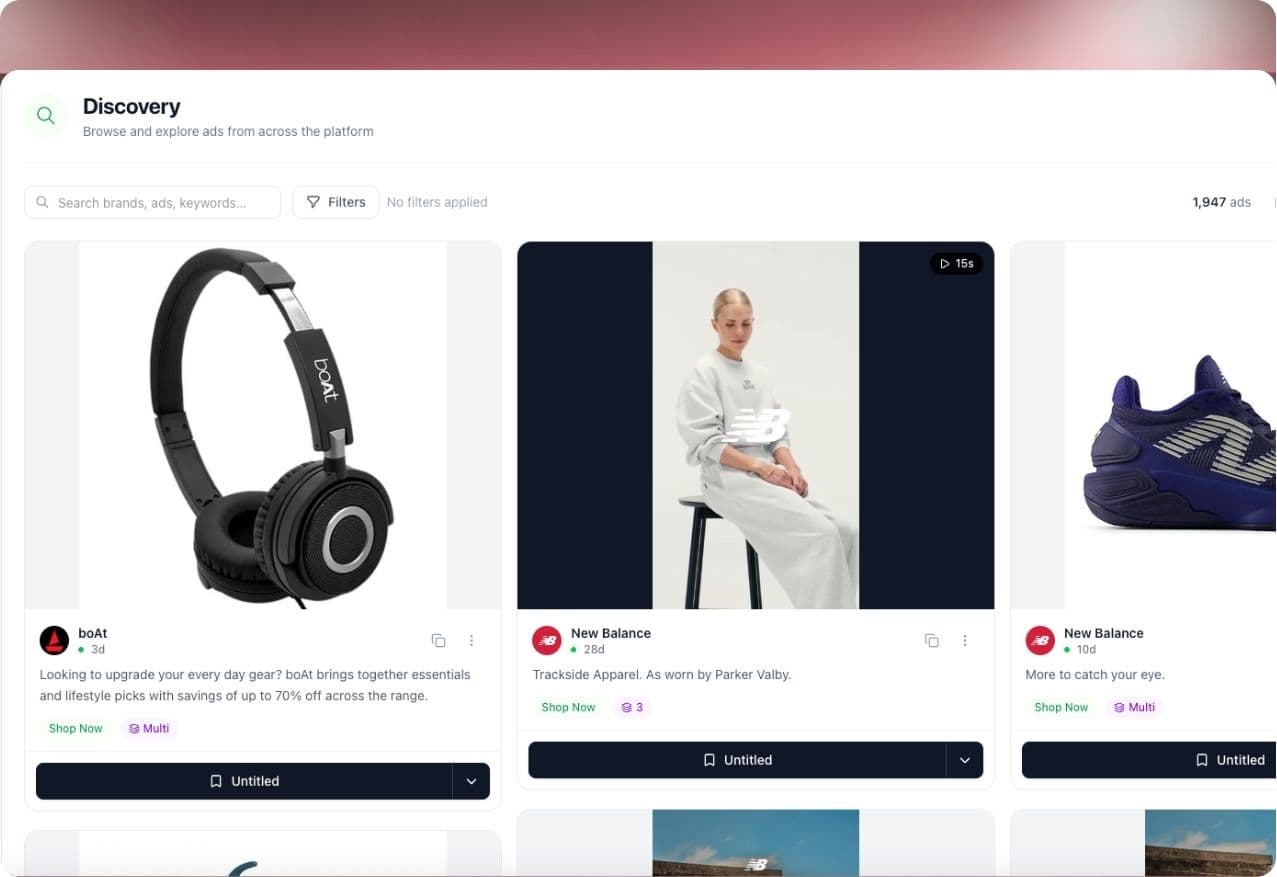
- Seer Discovery is where you search for ads, study examples, and find inspiration by brand, keyword, format, platform, or creative angle.
- Seer Eye tracks competitors so you can spot new campaigns, repeated angles, spend shifts, and creative changes without manual checking.
- AI Boards act like a structured swipe file where you save, organize, tag, share, and analyze useful ad references.
- AI Brief turns saved ads and notes into creative briefs for static ads, videos, landing pages, email campaigns, and other marketing assets.
- The best workflow is simple: discover ads, inspect the strategy, save the strongest examples, monitor competitors, then brief new creative from the patterns you find.
What Is Seercraft?
Seercraft is an ad creative intelligence platform.
That means it is not only a place to look at ads. It is a system for turning public ad signals into creative decisions.
Most ad libraries are built for browsing. Seercraft is built for strategy. Instead of manually searching, screenshotting, renaming files, and writing briefs from scratch, you can keep the full research loop in one place.
Use Seercraft to:
- Search for ads with natural language
- Filter ads by platform, format, industry, and performance signals
- Analyze hooks, CTAs, visuals, copy, and landing page direction
- Track competitors over time
- Save strong examples into organized boards
- Share boards with teammates or clients
- Generate briefs from saved references
- Build a creative testing backlog grounded in market evidence
The goal is not to copy competitors. The goal is to understand what is happening in your market before you decide what to make next.
Who Seercraft Is For
Seercraft is useful for teams that need to make paid creative faster without lowering the quality of strategic thinking.
Performance marketers can use it before launching tests, so the first batch of concepts starts from stronger market examples.
Creative strategists can use it to study hooks, formats, messaging angles, offers, and category patterns before writing briefs.
Agencies can use it to research clients, track competitor movement, build swipe files, and present clearer creative direction.
Founders can use it to understand how a category sells before spending more money on production or media.
Designers, editors, and UGC teams can use boards and briefs to work from concrete references instead of vague requests like "make it feel more premium" or "make it more viral."
Use Seercraft If
- You want a faster way to find relevant ad examples.
- You need to monitor competitors without checking ad libraries manually.
- Your team saves inspiration, but struggles to turn it into production-ready briefs.
- You manage multiple brands, clients, markets, or campaigns.
- You want better inputs before using AI to generate copy, concepts, or briefs.
- You need one place for creative research, references, notes, and collaboration.
Seercraft May Not Be the First Tool You Need If
- You only launch ads once or twice a year.
- You already have a full research, swipe file, monitoring, and briefing system that your team consistently uses.
- You want a tool to replace creative judgment entirely.
- You are looking only for final design production, not creative intelligence.
Seercraft is strongest when you use it to improve the decisions before production starts.
The Seercraft Product Workflow
The product is easiest to understand as a loop.
- Discover what brands are running.
- Inspect the strategy behind the ads.
- Save useful examples into boards.
- Monitor competitors for changes.
- Turn patterns into briefs.
- Launch new creative with clearer direction.
Each Seercraft product supports one part of that loop.
Seer Discovery
Seer Discovery is the search layer.
Use it when you want to find ads in a category, study a competitor, research a format, or collect examples for a campaign. You can search by brand, keyword, category, platform, format, or natural language prompt.
For example:
- "DTC skincare UGC ads with before and after hooks"
- "SaaS retargeting ads using problem-solution copy"
- "Fitness app testimonial video ads"
- "Static Meta ads for a limited-time offer"
- "Fashion carousel ads focused on product drops"
The most useful searches describe the customer problem, creative format, or messaging angle. Exact brand searches are helpful, but category searches often reveal ideas your direct competitor list would miss.
Seer Eye
Seer Eye is the monitoring layer.
Use it to track the brands that matter most to your market. Once a competitor is added, Seer Eye helps you watch for new ads, creative tests, spend trend changes, repeated messaging, and shifts in campaign direction.
This matters because one isolated ad is just an example. A pattern over time is a signal.
If a competitor launches 20 new video ads around the same product claim, that may tell you they are testing or scaling a message. If they stop using an offer after months of repetition, that may also matter. Seer Eye helps you notice those changes without rebuilding the same competitor search every week.
AI Boards
AI Boards are the organization layer.
Use boards to save ads from Seer Discovery, group references by project, and keep research usable for your team. A board can be organized around a competitor, product, campaign, audience, format, hook, offer, or client.
Common board ideas include:
- "Q4 Meta Concepts"
- "Competitor Hooks"
- "UGC Testimonials"
- "Founder Story Ads"
- "Static Offer Tests"
- "Landing Page Angles"
- "Skincare Before and After"
- "Client Research: New Product Launch"
The point of a board is not to collect every decent ad you see. The point is to create a focused set of references that can shape a decision.
AI Brief
AI Brief is the execution layer.
Use it when a board has enough useful references and your team is ready to move from research to production. AI Brief can help turn saved ads, brand context, notes, and creative patterns into a structured brief.
A strong brief usually includes:
- Campaign objective
- Target audience
- Customer problem
- Hook direction
- Messaging angle
- Visual direction
- Format requirements
- CTA
- Reference ads
- Production notes
- What to avoid
The first draft should not be treated as final strategy. Use it as a faster starting point, then refine it with your team's knowledge of the brand, offer, audience, and channel.
Step 1: Create Your Account and Set Up Your Profile
Start by creating your Seercraft account from the registration page.
During setup, add the basics:
- Your role
- Company name
- Company website
- Industry
- Company size
- Primary market or target country
- The kind of creative work you care about
This setup matters. Seercraft can use your company and industry context to make competitor suggestions and discovery results more relevant.
If you are using Seercraft for an agency client, start with one client first. It is better to build one clean workflow than to create ten messy projects at once.
Step 2: Add Competitors to Track
The fastest way to make Seercraft useful is to add competitors.
Start with 5 to 10 brands. Choose a mix of:
- Direct competitors selling a similar product
- Category leaders with high creative volume
- Aspirational brands with stronger creative strategy
- Adjacent brands selling to the same customer
- Brands your customers already recognize
- Brands with similar price points, offers, or audience segments
Do not only add brands that look exactly like yours. Adjacent brands often give you better creative ideas because they solve similar customer problems with different messaging.
For example, a skincare brand should not only track skincare companies. It may also learn from wellness brands, supplement brands, creator-led beauty brands, dermatology clinics, and premium personal care brands.
Step 3: Search for Useful Ads in Seer Discovery
After setup, open Seer Discovery and begin broad.
If you sell a dark spot serum, do not only search the exact product category. Search around the problem, audience, creative format, and promise.
Try searches like:
- "dark spot serum before after UGC"
- "skincare testimonial ads for women over 30"
- "beauty brand founder story ad"
- "dermatologist style product education video"
- "limited time skincare offer static ad"
- "premium skincare comparison ad"
When results come back, avoid saving everything that looks polished. Ask whether the ad teaches you something.
Look for:
- A clear hook in the first line or first three seconds
- A specific customer problem
- A strong offer or reason to act now
- Proof, demonstration, testimonial, or authority
- Visual structure that supports the message
- A CTA that matches the stage of awareness
- Signs that the brand is repeating the same angle elsewhere
One good-looking ad may be useful inspiration. A repeated pattern can become a creative test.
Step 4: Open the Ad Details Before Saving
Before adding an ad to a board, inspect it.
Look at the pieces behind the asset:
- Ad copy
- Headline
- CTA
- Platform
- Format
- Visual structure
- Landing page direction
- Brand positioning
- Messaging angle
The goal is to move from taste to strategy.
Weak note:
"Good skincare ad."
Useful note:
"Leads with visual proof, introduces the customer pain quickly, then moves into a benefit-led offer. Strong cold traffic angle for problem-aware buyers."
That second note can help a strategist, designer, editor, or media buyer understand why the ad matters.
Step 5: Save the Best References to AI Boards
When an ad is worth keeping, save it to an AI Board.
Create boards around decisions your team needs to make. For example:
- A product launch
- A competitor research sprint
- A new audience segment
- A specific ad format
- A creative testing backlog
- A campaign theme
- A client presentation
Keep boards focused. A board with 20 sharp references is usually more useful than a board with 200 random ads.
For each saved ad, add enough context that the board stays useful later. Notes can answer:
- Why did we save this?
- What part of the ad matters?
- Is this a hook, offer, format, visual, or landing page reference?
- Should we adapt this idea, avoid this idea, or watch this pattern?
- Which campaign or product could this inform?
Over time, AI Boards become a creative memory for your brand.
Step 6: Organize Boards for Real Work
A swipe file becomes valuable when it is easy to search, explain, and use.
Use names your team understands quickly:
- Good: "Spring Launch UGC Hooks"
- Good: "Competitor Offer Tests"
- Good: "Creator-Led Beauty Proof Ads"
- Weak: "Ads I Like"
- Weak: "Random Inspo"
- Weak: "Meta Screenshots"
You can organize by:
- Competitor
- Campaign
- Product
- Audience
- Funnel stage
- Hook
- Offer
- Format
- Emotion
- Landing page angle
If your team collaborates inside boards, agree on a simple tagging system. Keep it lightweight. A small set of tags used consistently is better than a complex system nobody follows.
Step 7: Monitor Competitors with Seer Eye
Manual research is useful, but it is easy to forget.
Seer Eye gives you a regular view of competitor movement. Use it to check:
- New ad launches
- Repeated creative angles
- Format shifts
- Offer changes
- Landing page changes
- Spend trend changes
- Seasonal campaign activity
- Weekly competitor reports
For most teams, a weekly review is enough. High-volume advertisers and agencies may check more often.
The important part is to look for changes, not just ads.
Ask:
- Which competitor is increasing creative volume?
- Which message is being repeated?
- Which format appears more often than last month?
- Which old angle disappeared?
- Which offer is being pushed harder?
- Which brands are moving into our positioning territory?
These questions help you turn monitoring into strategy.
Step 8: Generate an AI Brief
Once a board has a focused set of examples, use AI Brief.
A good moment to generate a brief is when you have:
- A clear product or campaign goal
- A specific audience
- A saved set of relevant ad references
- Notes on hooks, offers, visuals, or angles
- Competitor context
- Production constraints
AI Brief can help turn those inputs into creative direction. Then your team can refine the draft.
For example, instead of asking for "five new skincare ads," you can brief around:
- Audience: problem-aware buyers researching dark spots
- Hook: visual proof in the first three seconds
- Angle: dermatologist-inspired education without sounding clinical
- Format: UGC video and static comparison ad
- Proof: customer transformation, ingredient explanation, review snippet
- CTA: low-friction trial offer
That is a much better starting point than a blank page.
A Simple Weekly Seercraft Workflow
If you are not sure where to start, use this weekly rhythm.
Monday: Review Competitor Movement
Open Seer Eye and check what tracked competitors launched recently. Save anything that signals a new test, repeated message, offer shift, or format change.
Tuesday: Research the Category
Use Seer Discovery to search beyond direct competitors. Look at adjacent brands, different markets, and ads targeting similar customer problems.
Wednesday: Clean Up Boards
Move the strongest examples into the right AI Boards. Delete weak saves. Add short notes explaining why each ad matters.
Thursday: Generate Briefs
Use AI Brief to turn the strongest board into a campaign brief. Add your brand constraints, product details, offer, and production requirements.
Friday: Choose Tests
Review the week's research and pick the concepts worth making next. Decide what the team will produce, what you will monitor, and what you will ignore.
This rhythm keeps creative strategy close to market evidence without slowing the team down.
Example Workflow: From Competitor Ad to Creative Brief
Imagine you are launching paid ads for a fitness app.
In Seer Discovery, you search:
"fitness app UGC ads for beginners"
You find several ads where creators lead with a relatable problem: not knowing what workout to do at the gym. You notice three competitors repeat the same pattern:
- Hook: "I stopped wandering around the gym"
- Visual: creator filming inside a real gym
- Proof: app screen showing a planned workout
- CTA: start a free trial
You save the strongest examples to an AI Board called "Beginner Gym Anxiety Hooks."
Inside the board, you add a note:
"The repeated problem is not motivation. It is uncertainty. The ad should show the app removing decision fatigue."
Then you use AI Brief to generate a brief for a short UGC video:
- Open with the creator standing near equipment looking unsure
- Show the app choosing the workout
- Cut to three simple movements
- End with the user feeling confident and ready for the next session
That is the value of the workflow. You are not copying an ad. You are extracting a market insight and turning it into an original creative direction.
Best Practices for Better Results
Save Fewer, Better Ads
Do not treat Seercraft like a dumping ground. Save ads because they reveal a useful pattern, not because they look nice.
Search by Problem, Not Only Product
Customers do not think in product categories all day. They think in problems, desires, objections, and moments. Search around those.
Track Direct and Adjacent Competitors
Direct competitors show you category norms. Adjacent brands show you fresh angles you can adapt.
Look for Repetition
If a brand repeats a hook, offer, or format across many ads, pay attention. Repetition often tells you more than one polished example.
Add Notes While the Insight Is Fresh
The best time to write the note is when you save the ad. A two-sentence note now can save your team from guessing later.
Turn Every Research Session into an Output
End each session with something concrete: a board, a shortlist, a brief, a test idea, or a decision about what not to make.
Common Mistakes to Avoid
Saving Too Much
More references do not automatically create better strategy. A large board with no point of view is hard to use.
Copying Surface Details
Do not copy a competitor's color, layout, or script structure without understanding the underlying strategy. The useful part is the customer insight, not the decoration.
Ignoring Landing Page Direction
Ads do not work alone. Look at the promise the ad makes and the landing page it sends people to. Strong creative usually has a matching post-click experience.
Treating AI Brief as Final
AI Brief is a starting point. The best output comes when you add brand context, customer knowledge, offer details, and production constraints.
Reviewing Competitors Only When Performance Drops
Creative intelligence should be a habit, not a panic move. A weekly review gives you better context before performance changes become urgent.
Frequently Asked Questions
Is Seercraft only for Meta ads?
Seercraft is built for ad creative intelligence across major ad platforms. Use it to discover ads, monitor competitors, save references, and generate briefs from the creative patterns you find.
How many competitors should I track?
Start with 5 to 10. That is enough to see useful movement without overwhelming your workflow. Add more once you know which brands actually influence your creative strategy.
Should I copy competitor ads?
No. Use competitor ads to understand hooks, offers, formats, customer problems, and positioning. Then adapt the insight to your own brand, audience, and product.
How often should my team use Seercraft?
For most teams, once or twice a week is enough. Agencies, high-spend advertisers, and fast-moving categories may use it daily.
What should I do first after signing up?
Add your top competitors, run one broad category search in Seer Discovery, save 10 to 20 strong ads into an AI Board, and generate your first AI Brief from that board.
Can Seercraft replace a creative strategist?
No. Seercraft gives creative strategists better inputs and faster workflows. Human judgment still matters for brand fit, offer quality, audience nuance, and final creative decisions.
What makes a good AI Board?
A good AI Board is focused, organized, and useful for a decision. It should make clear what you are studying, why each ad was saved, and how the references might influence future creative.
Start Using Seercraft
The teams that win with paid creative do not wait for inspiration to appear. They build a system for finding it, understanding it, and turning it into production.
Seercraft gives you that system: AI-powered discovery, competitor monitoring, organized swipe files, creative analysis, collaboration, and brief generation in one workflow.
Try Seercraft free for 7 days and build your first research-to-brief workflow today.